


Page 75 - Demo
P. 75
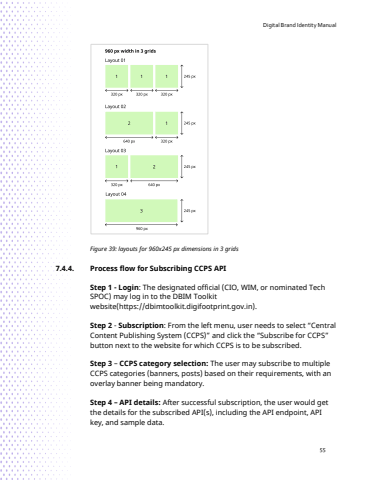
Digital Brand Identity Manual55Figure 39: layouts for 960x245 px dimensions in 3 grids 7.4.4. Process flow for Subscribing CCPS APIStep 1 - Login: The designated official (CIO, WIM, or nominated Tech SPOC) may log in to the DBIM Toolkitwebsite(https://dbimtoolkit.digifootprint.gov.in).Step 2 - Subscription: From the left menu, user needs to select %u201cCentral Content Publishing System (CCPS)%u201d and click the %u201cSubscribe for CCPS%u201d button next to the website for which CCPS is to be subscribed.Step 3 %u2013 CCPS category selection: The user may subscribe to multiple CCPS categories (banners, posts) based on their requirements, with an overlay banner being mandatory.Step 4 %u2013 API details: After successful subscription, the user would get the details for the subscribed API(s), including the API endpoint, API key, and sample data.


